CS2 PARAMETERS and COMMANDS (Launch Parameters). Goowned
Improve your FPS, adjust your resolution and configure the game professionally.
🚀 DOMINATE THE GAME BEYOND COMMANDS
Optimizing your CS2 is key, but having the real edge is another level. Join the Goowned community today and play like a pro.
Private Software • 100% Undetectable • 24/7 Support
AFTER THE UPDATE FROM CS:GO TO CS2, PARAMETERS AND COMMANDS REMAIN THE SAME, WITH SOME ADDITIONAL IMPROVEMENTS.
- Brightness: 100%
- Aspect Ratio: Widescreen 16:9
- Resolution: 1920 x 1080 (or your native screen resolution)
- Display Mode: Fullscreen
- Refresh Rate: Matching your monitor, 144 Hz in our case.
- Power Saving Mode: Disabled
- Boost Player Contrast: Enabled
- Wait for Vertical Sync: Disabled
- Current Video Values Preset: Custom
- Multisampling Anti-Aliasing Mode: 4x MSAA (Disabled for older PCs)
- Global Shadow Quality: High (shadows can be key; lower to medium on weaker rigs)
- Model / Texture Detail: Medium
- Texture Filtering Mode: Anisotropic 4x
- Shader Detail: Low
- Particle Detail: Low
- Ambient Occlusion: Disabled
- High Dynamic Range: Performance
- FidelityFX Super Resolution: Disabled
- NVIDIA Reflex Low Latency: Enabled
WHAT ARE LAUNCH PARAMETERS FOR CS2?
Launch parameters or options for CS2 are custom settings any Steam user can use to tweak their game experience. They load with priority and overwrite the default configurations of the VALVE title. Many parameters exist tailored to improve tickrate, boost FPS, and adjust technical details.
HOW TO EXECUTE CS2 LAUNCH PARAMETERS?
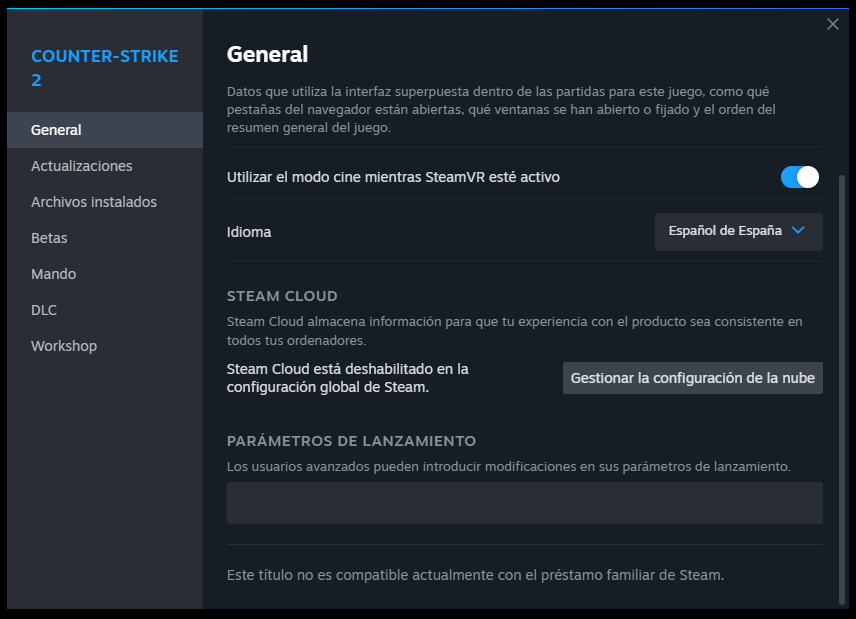
To configure and alter CS2 launch options, follow these steps:
These are configured right on Steam, not inside the game console.
- Right-click the game inside your Steam Library
- Select the Properties option
- Inside Launch Options, type your desired commands separated by a single space.
- Simply close the tab and they will automatically save.
THE BEST LAUNCH PARAMETERS FOR CS2
You can dramatically optimize your game flow using these core parameters. Check our list to see what they do:
-novidSkips the initial introductory video. Good for speeding up launches.-nojoyDisables joystick support, freeing up precious RAM memory.-tickrate 128Adjusts offline servers to standard competitive 128 tick rate.-lvLow violence mode (less blood).-language englishOverrides your Steam language and boots the game in English.-panoramaPrompts the new Panorama UI system.-consoleBrings up the developer console as soon as you arrive at the menu.-nod3d9ex1Improves Alt-Tabbing speeds.
ALL COMMANDS AND LAUNCH OPTIONS FOR CS2
Let's check further in-game commands related to connection, tweaks, and HUD elements:
connect x.x.x.xConnects directly to the specified IP.retryReconnects to the last played server.disconnectTerminates your current server connection.volume xAlters game master volume (0.0 to 1.0).statusPrints account and server info via console.exitTriggers a game crash/exit instantly.killForces self-elimination.bind x yBinds any key to any respective action (Ex: bind K kill).cl_autowepswitch 0No longer swaps weapons when picking them from the ground.closeonbuy 1The buy menu minimizes after a purchase.hud_takesshots 1Screen-captures right when the match concludes.gameinstructor_enable 0Turns off newbie tooltips.cl_cmdrate 128&cl_updaterate 128Forces competitive networking rates.voice_loopback 1Replays your microphone to test clarity.hud_scaling XHUD Size (0.5 is default).cl_drawhud x1 shows HUD, 0 hides HUD completely.
COMMANDS TO SHOW FPS IN CS2
Frames per second are crucial for shooters. Make sure to track them efficiently:
cl_showfps 1Toggles the simplest FPS counter.net_graph 1The complete diagnostic tool for network parameters (ping, choke, loss).net_graphproportionalfont XAdjust text scale for net defaults.net_graphpos XPosition adjusting (1 right, 2 center, 3 left).
COMMANDS TO INCREASE FPS IN CS2
To maintain flawless responsiveness during competitive gameplay:
fps_max xCaps maximum frame outputs.-highSignals CPU priority for CS2 executables. Best utilized on weak specs.-threads 4Allocates proper Core Threading.-limitvsconstCaps vertex processing, great for ancient GPUs.-forcenovsyncAggressively drops any embedded VSync routines.-softparticlesdefaultoffCancels the smoothing process of smoke and fire assets.+mat_queue_mode 2Extremely important to prompt multi-core acceleration.+r_dynamic 0Shuts off dynamic flashes on map geometry for massive improvements.
Ready-to-use boilerplate array. Copy the line below and paste it within the properties section:
Adapt these settings according to your PC capabilities to preserve smoothness. Enjoy playing CS2 without disruptions!
Dynamic Command Wiki
-novid
Skips the Valve intro video for faster launch.
-nojoy
Disables joystick support to free up RAM memory.
-tickrate 128
Sets the tick rate to 128 for local servers.
-console
Automatically opens the console on game startup.
-high
Gives CS2 process high priority in the system.
-fullscreen
Forces the game to start in fullscreen mode.
-windowed
Forces the game to start in windowed mode.
-threads X
Assigns the number of CPU cores (e.g., -threads 4).
-language X
Changes the game language (e.g., -language english).
fps_max 0
Removes the FPS limit for maximum performance.
cl_showfps 1
Displays a simple FPS counter on the screen.
net_graph 1
Shows detailed network and FPS information.
+mat_queue_mode 2
Enables multi-core processing mode for a big FPS boost.
+r_dynamic 0
Disables dynamic lighting for better performance.
-softparticlesdefaultoff
Disables soft particle effects.
-limitvsconst
Limits vertices to 256, great for older GPUs.
hud_scaling X
Adjusts the overall size of the interface.
cl_drawhud 0
Hides the entire HUD completely.
cl_hud_color X
Changes the HUD color (0 to 10).
cl_hud_bomb_under_radar 1
Shows the bomb icon under the radar.
cl_hud_playercount_pos 1
Moves the player counter to the bottom.
connect IP
Connects you directly to a specific IP.
retry
Reconnects you to the last played server.
disconnect
Disconnects you from the current server.
rate 128000
Sets the network traffic optimally.
voice_scale X
Adjusts your teammates' voice volume.
voice_loopback 1
Lets you hear yourself to test your mic.
sv_cheats 1
Enables admin commands on local servers.
noclip
Enable flying and passing through walls (requires sv_cheats 1).
sv_infinite_ammo 1
Infinite ammo and grenades for practice.
bind KEY CMD
Binds a command to a key (e.g., bind v noclip).
status
Shows detailed server and player information.
kill
Forces self-elimination.
exit
Exits the game instantly.